
You upload a video you genuinely believe in, wait a few days, and it’s sitting at 300 views while a similar video from another channel is at 30,000. The content quality feels comparable. So what’s actually different?
Sometimes the honest answer is simply that YouTube hasn’t recommended the winning video to more people yet either, and it’s early days — algorithmic discovery genuinely does take time to build momentum, even for strong content. But often, a real gap exists in the basic SEO fundamentals — title phrasing, description structure, tag relevance — and it’s genuinely hard to spot those gaps just by staring at your own upload, because you already know what your video is about, so it’s easy to assume it reads that way to a stranger too.
A youtube seo checker exists to remove that blind spot by scoring the actual elements of your upload against what’s known to perform well, rather than relying on your own read of your own work.
Why Self-Auditing Your Own Video Is Genuinely Hard
There’s a specific reason creators struggle to spot their own SEO gaps: familiarity bias. By the time you’ve spent hours filming and editing a video, you know exactly what it’s about, so your title and description feel obviously clear to you — even when they’d be genuinely confusing or vague to someone with zero context stumbling across it in search results.
This is the same reason writers struggle to proofread their own work; your brain fills in gaps automatically because it already knows what’s supposed to be there. An objective check against your actual title, description, and tags — separate from your own read of them — catches things you’d otherwise miss simply because you’re too close to the content.
Why Metadata Deserves the Same Attention as Editing
It’s worth stating plainly: for many creators, editing gets hours of focused attention while metadata gets thirty seconds right before hitting publish. That imbalance doesn’t match how much each piece actually influences whether the video gets seen at all. A brilliantly edited video with vague, rushed metadata is still fighting an uphill battle to even reach the audience who’d genuinely appreciate that editing work in the first place, simply because it never surfaces in front of them to begin with.
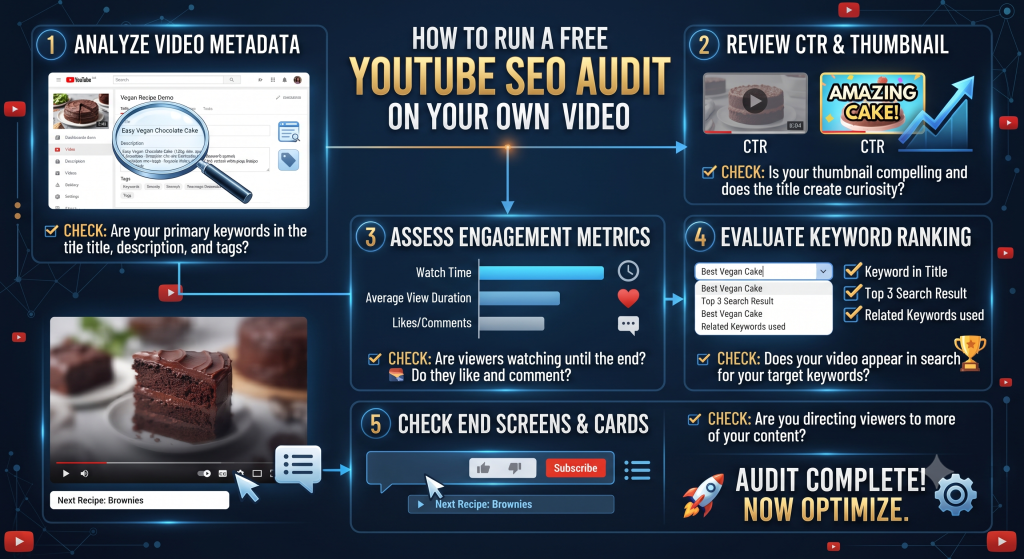
What a Proper YouTube SEO Check Actually Looks At
Title analysis. Does your title contain a clear, relevant keyword? Is it a reasonable length (not cut off in search results)? Does it read naturally rather than looking keyword-stuffed?
Description quality. Does the crucial first line contain relevant context and keyword signal, or does it open with generic filler? Is the description reasonably structured, or is it a single unbroken block of text?
Tag relevance. Are the tags actually related to the video’s real content, or vague and generic? Is there a reasonable mix of broad and specific tags, or is the list either too thin or excessively padded?
Keyword consistency across elements. Does your main keyword show up consistently across title, description, and tags, or does each element seem to be targeting something slightly different, diluting your overall topical signal to YouTube?
Using Our SEO Analyzer
Our free SEO Analyzer pulls in your video’s title, description, and tags directly from a pasted URL and scores each element, flagging specific issues rather than giving a vague generic pass/fail. You’ll typically see feedback like: title length is fine but keyword placement could move earlier, description’s first line is too generic, tag list is thin relative to similar top-ranking videos in the space.
This is meaningfully more useful than a single overall score with no explanation, because it tells you exactly which specific piece needs attention rather than leaving you guessing at what to actually fix.
A Realistic Audit Walkthrough
Say you run a video through the checker and it flags the following:
Title: “My New Camera Setup” — flagged as too vague, no specific keyword signal, doesn’t indicate what makes this setup notable or worth watching.
Description opening line: “Hey guys, here’s my new setup!” — flagged as generic filler in the highest-visibility part of your description.
Tags: Only three tags total, all extremely broad (“camera,” “setup,” “gear”) — flagged as too thin and too generic to provide meaningful topical signal.
Based on that, you’d revise toward something like: Title — “The $1,200 Camera Setup That Replaced My $4,000 Rig.” Description opening — “Here’s the exact budget camera setup I switched to after five years shooting on professional gear, and why it actually holds up.” Tags — expanded to include a mix like “budget camera setup,” “camera gear for youtube,” “affordable filmmaking setup,” alongside the original broad terms.
Same video, same content — just fixed metadata giving it a real shot at actually being found by people searching for exactly this topic.
What an SEO Checker Can’t Fix
It’s worth being upfront here: an SEO checker analyzes metadata — title, description, tags. It cannot evaluate your thumbnail’s visual appeal, your video’s actual retention curve, or whether the content itself delivers on what the title promises. Those factors matter enormously, arguably more than metadata in many cases, and no automated tool can fully judge them for you.
Think of an SEO check as fixing the “can this video even be found and understood by search” layer. It’s a necessary foundation, not a complete growth strategy on its own. A perfectly optimized title and description won’t save a video that doesn’t hold attention past the first ten seconds — but a great video with weak metadata might never get the chance to prove itself either, since it may never surface to enough of the right people in the first place. Both layers matter, and they’re solving genuinely different problems, which is why treating either one as the whole answer tends to leave creators frustrated when fixing just one doesn’t move the needle as much as hoped.
When to Run an SEO Check
Before publishing. Catching issues before you hit publish is obviously the ideal time — you can fix a vague title or thin tag list in minutes, before the video’s metadata is locked in and already being indexed by YouTube’s systems.
On underperforming older videos. If you have videos that seem to be underperforming relative to their content quality, running them through a check can reveal whether weak metadata might be part of the story, and metadata is one of the few things you can actually edit after publishing without needing to re-upload anything.
Periodically on your best-performing content. Even videos doing well are worth an occasional check — search phrasing and competitive tag patterns shift over time, and a video that was well-optimized a year ago might benefit from a refresh based on current patterns.
A Note on What “Good” Actually Means Here
There’s no single universal SEO score that guarantees success, and it’s worth resisting the urge to treat a checker’s output as a strict pass/fail grade. What matters is whether the specific flagged issues are worth fixing for your specific video and niche — a flag about tag count, for instance, matters less for a video in an extremely narrow niche with limited relevant tags available than it would for a broad, competitive topic with dozens of obvious tag options.
Use the checker’s output as a set of specific, actionable things to consider, not as a final verdict on whether your video deserves to succeed — the goal is a useful checklist, not a scoreboard to obsess over.
How SEO Checks Fit Into a Broader Upload Workflow
If you’re publishing regularly, it helps to think of an SEO check as one step in a short pre-publish routine rather than an isolated task you do occasionally. A reasonable order looks something like: finalize your title using genuine keyword research, write your description with a strong specific opening line, build a tag list based on what’s actually working for similar top-ranking videos, then run the whole thing through a checker as a final sanity pass before you hit publish.
Treating it as the last step rather than the first means the checker is validating decisions you’ve already made deliberately, rather than being the sole source of your metadata decisions from scratch. It catches things you missed, rather than doing all the thinking for you — which is a meaningfully more reliable way to build a genuinely strong upload routine over time.
Common Patterns Across Videos That Fail an SEO Check
After running enough videos through a checker, a few recurring patterns tend to show up again and again:
The title and tags target different keywords entirely. A video titled around “budget camera setup” but tagged almost exclusively with generic terms like “camera” and “vlog” sends a diluted, inconsistent signal about what the video is actually about.
The description reads like an afterthought. Short, generic, written in under thirty seconds without any real thought — this is probably the single most common issue across underperforming videos of every size and niche.
Tags are either wildly thin or wildly excessive. Either three vague tags total, or forty loosely related ones stuffed in “just in case.” Both extremes tend to underperform a focused, well-researched middle ground.
No consideration of what real searchers would actually type. Metadata written entirely from the creator’s own internal vocabulary for the topic, rather than the phrasing an average searcher unfamiliar with the channel would realistically use.
Recognizing these patterns in your own past uploads is often the fastest way to improve your next one, since they tend to repeat across a creator’s whole catalog rather than being isolated to just one video.
Comparing Your Video Against Direct Competitors
Beyond auditing your own metadata in isolation, it’s worth running the same check on 2-3 directly competing videos in your specific topic for comparison. If your video scores similarly or better on every metric but still underperforms in actual views, that’s a meaningful signal the gap likely lies in your thumbnail, your title’s click appeal specifically, or the content’s actual retention — not your underlying SEO fundamentals. That distinction matters, because it tells you where to focus your next round of improvements rather than continuing to tweak metadata that was never really the problem.
Frequently Asked Questions
Can an SEO checker guarantee my video will rank? No tool can guarantee rankings, since YouTube’s algorithm weighs watch time, click-through rate, and audience retention alongside metadata. An SEO check improves your foundational discoverability, but the content itself still has to perform once people click.
Should I re-optimize metadata on old videos? Yes, especially on videos that seem to be underperforming relative to their content quality, or ones that were published using outdated keyword research. Metadata can be edited anytime without needing to re-upload the video.
How often should I run a check on active videos? There’s no strict schedule, but checking new uploads before publishing, plus a periodic pass over your best-performing older content every few months, covers the most valuable use cases without becoming a constant chore.
Is it worth checking a video that’s already performing well? It can still be useful, mainly to confirm what’s actually working so you can repeat the same approach on future uploads, rather than assuming success and accidentally dropping a good habit on your next video.
Run Your Own Check Now
Paste your video URL into the SEO Analyzer and see exactly which elements — title, description, tags — are pulling their weight and which ones might be quietly holding your video back from getting found by the people already searching for it. It takes under a minute, and it’s often the fastest way to rule out (or confirm) whether metadata is actually the reason a specific video isn’t performing the way you expected.
Unlock Your Channel’s Potential: Mastering AI for YouTube SEO