
The Ultimate Blueprint for Digital Video Compression and Web Playback Performance
Introduction to Modern Video Streaming Dynamics
In the contemporary digital landscape, video streaming has become the dominant method of content consumption across global networks. Consequently, data traffic generated by online video delivery requires immense bandwidth, forcing infrastructure engineers and web media creators to find a delicate balance between visual playback quality and file compression. Whenever a user plays a video file over a browser interface, a complex series of server-side data extractions and local device decoding processes take place within milliseconds. If these underlying data pipelines are poorly configured, viewers will experience catastrophic playback errors, including constant buffering loops, heavy pixelation, and dropped frames. Therefore, understanding the deep technical mechanics of video encoding, resolution matrices, and bitrate scalability is no longer just a requirement for corporate network engineers; it is an foundational skill for any media professional managing modern digital platforms.
Historically, digital video assets were massive, uncompressed arrays of raw image frames that required specialized hardware simply to playback locally. As the internet evolved from text-based web pages to rich, dynamic streaming environments, the necessity for robust compression technologies became undeniable. To compress these files without completely destroying their visual clarity, engineers developed sophisticated software algorithms known as codecs. These computational systems analyze raw video data to eliminate repetitive or unnecessary information, effectively packaging hours of high-definition content into highly compact files. However, compressing video assets is not a one-size-fits-all process. Different playback environments require vastly distinct optimization paths. For example, a high-fidelity display in a cinema requires maximum bitrates, whereas a mobile smartphone streaming content over a fluctuating cellular connection relies on aggressive encoding efficiency.
To navigate this intricate ecosystem, one must dissect the relationship between spatial resolutions, temporal frame rates, and data transmission bitrates. These three core metrics operate in a unified system, meaning that modifying a single value directly alters the performance of the entire media asset. Furthermore, the selection of the underlying compression codec determines how effectively a server can distribute video streams to diverse end-user devices. By mastering these configurations, platform managers can ensure their media architecture provides a flawless user experience, keeps data delivery costs to a minimum, and maximizes engagement across all device form factors.
The Anatomy of Video Resolution and Aspect Ratio Matrices
To fully grasp the mechanics of video optimization, it is essential to first analyze spatial resolution, which refers directly to the absolute width and height dimensions of a video frame measured in individual pixels. Every digital video display is a dense grid of microscopic light-emitting units. Consequently, the resolution configuration of a video asset dictates exactly how many pixels of information are rendered onto that grid during playback. When a video resolution matches the native pixel layout of a screen, the resulting image appears incredibly sharp and clear. Conversely, if a low-resolution video file is stretched across a massive high-definition monitor, the local display hardware must artificially interpolate the missing data, leading to a blurry, muddy, or heavily pixelated viewing experience.
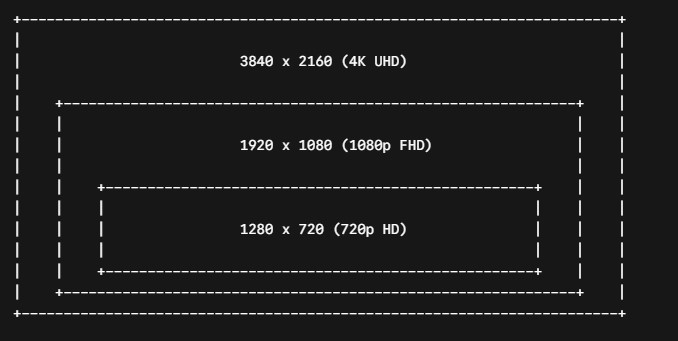
Over the past several decades, standard digital display standards have evolved through several distinct tiers, each increasing pixel density exponentially:
-
Standard Definition (480p): Utilizing a grid layout of $640 \times 480$ pixels, this classic format legacy remains standard for vintage media archiving, though it lacks the sharp clarity required for modern high-DPI modern devices.
-
High Definition (720p): Composed of a 1280 x 720 matrix, this standard represents the entry tier for high-definition streaming, offering a balanced middle ground for low-bandwidth wireless environments.
-
Full High Definition (1080p): Spanning a 1920 x 1080 frame, this standard remains the absolute baseline for modern web streaming, providing clear crisp details on laptops, monitors, and standard smart TVs.
-
Ultra High Definition (4K / 2160p): Operating on a massive grid of 3840 x 2160 pixels, this high-fidelity layout delivers cinematic quality, though it demands incredibly robust server delivery pipelines.
Alongside static resolutions, aspect ratios control the proportional shape of the visual frame, calculated as the mathematical ratio of width to height. The global standard for modern widescreen displays is 16:9, an optimal layout for cinematic landscape presentations. Alternatively, the rise of mobile devices has popularized vertical aspect ratios, such as $9:16$, forcing web systems to adapt their encoding pipelines dynamically. When text or video assets are forced into an incorrect aspect ratio frame without proper formatting scales, the image becomes distorted, or black bars appear along the edges of the media asset. Therefore, selecting the correct resolution target requires deep knowledge of your target audience’s hardware landscape.
Unraveling the Science of Bitrates and Data Transmission Pipelines
While resolution defines the spatial dimensions of a digital video file, the bitrate dictates the actual volume of data processed over a specific unit of time, typically quantified in megabits per second (Mbps) or kilobits per second (kbps). In simpler terms, if resolution is the size of the bucket, the bitrate is the rate at which water flows into it. Therefore, a video file with an exceptionally high spatial resolution like 4K will look remarkably poor if it is constrained by an artificially low bitrate, because there will not be enough digital data allocated to accurately color and draw every single pixel in the frame. This imbalance results in compression artifacts, blocky artifacts, and a loss of fine textures during high-motion action sequences.
To optimize data streaming assets cleanly, media architectures utilize three distinct bitrate allocation frameworks during the compression phase:
Constant Bitrate (CBR): [ 8 Mbps ] —> [ 8 Mbps ] —> [ 8 Mbps ] —> [ 8 Mbps ] (Flat line, wastes data) Variable Bitrate (VBR): [ 3 Mbps ] —> [ 9 Mbps ] —> [ 2 Mbps ] —> [ 12 Mbps ] (Dynamic, matches motion complexity)
-
Constant Bitrate (CBR): Under this method, the encoder applies a completely fixed data rate across the entire duration of the video timeline. Consequently, a static scene featuring a simple background will use the exact same amount of data as a highly complex action sequence. While CBR ensures completely predictable bandwidth consumption, it is highly inefficient for web streaming because it wastes storage during slow scenes and chokes during fast ones.
-
Variable Bitrate (VBR): This dynamic allocation strategy allows the encoder to continually adjust the data rate based on the visual complexity of the passing frames. As a result, simple talking-head segments receive lower bitrates, while complex panning shots are granted higher bandwidth allocations. Ultimately, VBR maximizes visual quality while maintaining a lower overall file size, making it the perfect option for web storage systems.
-
Constrained Variable Bitrate (CVBR): This hybrid model operates like VBR but enforces a strict upper ceiling on data peaks. Following this method, server infrastructure managers can prevent sudden network traffic spikes while still benefiting from dynamic file compression.
The fundamental formula for determining raw uncompressed video file sizes before applying any algorithmic compression models highlights why encoding is an absolute necessity:
File Size = Horizontal Pixel x Verticle Pixels X Bit Depth x Frame Rate x Duration
When we calculate this for a standard 1080p video at 60 frames per second with an 8-bit color depth lasting for just one hour, the uncompressed data footprints quickly skyrocket past several hundred gigabytes. Consequently, web servers must strictly align with modern W3C Media Source Extensions Streaming Standards to break these massive payloads down dynamically for browsers.By applying VBR encoding pipelines, we can compress that exact same hour of high-definition content down to a highly manageable 3 to 5 gigabytes without any noticeable loss in human perceptual quality.
Deep Dive into Codec Architectures: From H.264 to AV1
A codec, which stands for compressor/decompressor, is the core mathematical engine that executes the actual data minimization processing. Without these specialized file wrappers, web platforms would completely collapse under the weight of unmanaged video data streams. Over the decades, software consortia have continually iterated on codec designs, creating more efficient mathematical equations capable of squeezing larger resolution arrays into increasingly smaller data pipelines.
| Codec Name | Industry Title | Compression Efficiency | Ideal Deployment Target |
| H.264 | AVC (Advanced Video Coding) | Baseline Standard | Universal Legacy Compatibility |
| H.265 | HEVC (High Efficiency Video Coding) | $50\%$ higher than H.264 | 4K UHD & HDR Mobile Streaming |
| VP9 | open-source Google Engine | High Web Efficiency | High-Density HTML5 Web Players |
| AV1 | AOMedia Next-Gen Codec | Next-Gen Efficiency ($30\%$ past VP9) | Ultra-Low Bandwidth 4K/8K Networks |
The absolute workhorse of the modern internet remains H.264 (AVC). Developed in the early 2000s, this codec is natively supported by almost every smartphone, browser, microchip, and operating system in existence today. Because it features universal hardware acceleration, decoding an H.264 video uses almost zero battery power on a user’s device. However, H.264 is structurally inefficient when handling ultra-high-definition 4K content. Consequently, the industry introduced H.265 (HEVC), which successfully slashes the required streaming bitrate of H.264 by roughly half while retaining pristine image details. The primary drawback of HEVC lies in its restrictive licensing fees, which led open web groups to develop open-source alternatives.
To bypass corporate patent walls, the industry coalesced around VP9 and the revolutionary AV1 codecs. AV1 represents the absolute cutting edge of web streaming technology, offering unmatched data compression and allowing high-definition files to stream effortlessly over weak 3G or 4G mobile networks. However, because AV1 relies on highly complex computational logic, encoding an AV1 asset requires massive server processing power. Immediately following these file preparations, the web server must also ensure the end-user’s device has the hardware capabilities required to smoothly unpack the stream without causing the device’s processor to overheat.
The Crucial Role of Audio Bitrates and Container Formats
When optimizing video files for web delivery, developers often make the mistake of focusing entirely on visual parameters while completely ignoring the accompanying audio stream. However, poor audio quality is instantly recognizable to an audience, often destroying the perceived value of a high-definition video track. Just like video assets, digital audio streams must be sampled, compressed, and encoded cleanly using optimized bitrates. Standard web audio bitrates generally range from 96 kbps up to 320 kbps, depending on the required sonic fidelity.
For talking-head videos, interviews, and educational lectures, an audio bitrate of 128 kbps using the AAC (Advanced Audio Coding) codec provides flawless clarity while keeping file weights to an absolute minimum. Alternatively, if the media asset features intricate musical compositions, complex sound effects, or theatrical soundscapes, upgrading the audio allocation to 256 kbps or 320 kbps ensures that subtle high and low frequencies remain perfectly preserved.
Once both the video track and audio track have been individually compressed via their respective codecs, they must be bundled into a single file format known as a container. A container format acts as a digital box that houses the video stream, audio track, subtitle files, and metadata tags synchronizing them into a cohesive unit. The most universal container for web deployment is the MP4 (.mp4) format, which plays natively across every web browser without requiring external plugins. Other notable containers include WebM (.webm), designed specifically for lightweight web page integration, and MKV (.mkv), an incredibly flexible container favored for high-fidelity archiving due to its ability to hold an unlimited number of audio and subtitle variants.
Practical Optimization Workflows for Web Platforms
Ultimately, deploying video assets onto modern web interfaces requires a systematic workflow that balances performance, cost, and visibility. To begin with, authors must evaluate the entry points of their traffic. If a substantial portion of your audience accesses your platform via mobile data networks, hosting massive, uncompressed media files directly on your web server will cause your page load speeds to plummet, severely damaging your user experience metrics. Instead, implementing an automated compression pipeline before file deployment ensures that assets are tailored for immediate web delivery.
The most effective approach for modern web systems involves using a technique called Adaptive Bitrate Streaming (ABR). Under this architecture, the server does not store just a single copy of a video file. Instead, the video is encoded into multiple resolution and bitrate variants—such as 480p, 720p, and 1080p. When a user clicks play, a script monitors their current internet connection speed in real time. If the user’s connection dips, the player instantly shifts to a lower resolution stream without pausing playback. Consequently, the user experiences continuous, uninterrupted viewing, while your server bandwidth consumption adapts dynamically to real-world network constraints.
Ready to streamline your website’s video and audio asset footprints? Head over to our free YT Tools Online to access our array of instant browser-based media utilities.