
Open the tag field on any video upload page and you’ll notice YouTube doesn’t give you much guidance. There’s no built-in suggestion tool telling you what’s actually working, no indication of which tags matter more than others, just an empty box waiting for you to type something in and hope it helps.
Most creators respond to that blank space in one of two ways: they either type in five or six obvious, generic words related to their topic and move on, or they go the opposite direction and cram in forty tags trying to cover every possible angle. Neither approach reflects how tags actually function, and neither is likely to move the needle much.
Finding the best youtube tags for a specific video is a more deliberate process than either extreme, and it’s worth understanding properly if you want tags to actually contribute to your video’s discoverability instead of just being a box you fill out of habit.
What Tags Actually Do (And Don’t Do)
Let’s be direct about this: tags are not a major ranking factor anymore. YouTube’s algorithm weighs watch time, click-through rate, and audience retention far more heavily than tag content. A boring video with perfect tags will not outperform an engaging video with no tags at all.
What tags do provide is contextual clarification, primarily useful in two specific situations:
Disambiguation. If your video title or content could reasonably be interpreted multiple ways, tags help YouTube understand which specific meaning applies. A video about “python” could be about the programming language or the snake — tags help clear that up quickly.
Misspellings and alternate phrasings. If people commonly search for your topic using a specific misspelling, abbreviation, or regional term variation, including that as a tag helps YouTube connect your video to that search even if your title and description use the more standard phrasing.
Tags are a small, supporting signal — not a growth strategy on their own. But small supporting signals still matter, especially in competitive niches where every advantage counts.
The Three Categories of Tags Worth Including
A well-built tag list usually contains a mix of three different tag types, not just one repeated category:
Broad category tags. These are wide, general terms describing your overall topic — things like “cooking,” “photography,” or “personal finance.” They help YouTube understand the general space your video belongs to, even if they’re too competitive to drive much traffic on their own.
Specific topic tags. These narrow in on exactly what your video covers — “sourdough starter troubleshooting” instead of just “cooking,” or “portrait photography lighting” instead of just “photography.” These are usually your most valuable tags because they match more specific search intent.
Long-tail and question-based tags. Full phrases matching how someone might actually type a search — “why is my sourdough starter not rising” or “how to fix flat portrait lighting.” These tend to have lower search volume individually but often convert better because they match a very specific need.
A tag list built entirely from broad category terms is too generic to help much. A tag list built entirely from ultra-specific long-tail phrases misses the broader categorization YouTube uses to understand your content’s general space. The mix matters.
How to Actually Research Tags Instead of Guessing
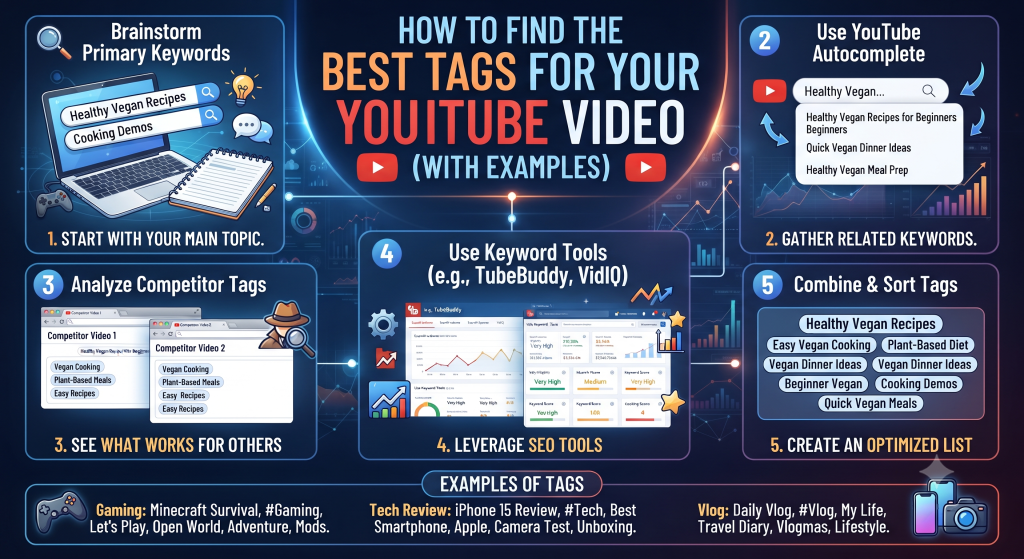
Start with what’s already ranking. Before typing anything into your own tag field, look at 4-5 videos currently performing well for your target topic. Extracting their tags (our Metadata Extractor does this instantly, pulling the full tag list from any public video URL) shows you real, validated patterns rather than guesses.
Look for repetition across multiple videos, not just one. If you extract tags from five ranking videos and three of them use “beginner sourdough tips,” that’s a strong signal it’s a genuinely valuable tag for this topic. A tag that appears in only one video might just be that creator’s personal habit rather than something meaningfully effective.
Note the specific long-tail variations each video uses uniquely. These often represent angles the bigger channels haven’t fully covered, which can be a real opportunity if your video addresses that specific variation directly.
Check YouTube’s own autocomplete. Start typing your topic into YouTube’s search bar and pay attention to what autocompletes. Those suggestions reflect actual common search phrasing, which makes them solid tag candidates.
A Worked Example
Let’s say you’re making a video about home espresso machines for beginners. Extracting tags from several top-ranking videos in this space commonly reveals a pattern like this:
Broad tags appearing frequently: “espresso,” “coffee,” “home espresso machine”
Specific tags appearing frequently: “espresso machine for beginners,” “best home espresso setup,” “espresso machine buying guide”
Long-tail variations appearing occasionally: “espresso machine vs pod machine,” “how much does a good espresso machine cost,” “espresso machine maintenance tips”
Your own tag list for a beginner-focused espresso video might combine 2-3 broad tags, 4-5 specific tags matching your exact angle, and 2-3 long-tail phrases covering related questions your video also happens to answer. That’s a considered, research-backed list — not a guess.
How Many Tags Should You Actually Use?
YouTube technically allows up to 500 characters total across all your tags combined, but more tags isn’t automatically better. A common, reasonable target is somewhere between 8 and 15 well-chosen tags rather than maxing out the character limit with every remotely related term you can think of.
Padding your tag list with dozens of loosely related or repetitive tags doesn’t provide additional benefit and, in extreme cases, can look manipulative to YouTube’s systems. Quality and relevance matter more than sheer quantity here.
Common Tag Mistakes to Avoid
Using only your channel name or brand as a tag and nothing else. This does essentially nothing for discoverability, since almost nobody is searching for your brand name if you’re not already established.
Tagging with completely unrelated trending terms to try to game the algorithm. Tagging an unrelated video with a currently trending, high-volume tag doesn’t work the way people hope — it can actually hurt relevance signals rather than help, since YouTube’s systems are built to detect mismatched context between tags and actual video content.
Copying a competitor’s entire tag list verbatim without adapting it. Their tags reflect their specific video’s angle. Blindly copying them without checking that they actually match your content’s specific focus can create the same relevance mismatch problem as tagging with unrelated trending terms.
Never updating tags on older videos. If an older video is still getting traffic but was tagged years ago with outdated phrasing, revisiting and updating its tags based on current research is a quick, low-effort refresh that can genuinely help.
Tags Are One Piece, Not the Whole Strategy
It’s worth repeating: tags support discoverability, they don’t drive it on their own. The videos winning in any competitive niche are winning primarily because of strong titles, compelling thumbnails, and content that holds attention — tags are the supporting layer underneath all of that, not a replacement for it.
Think of solid tag research as removing one small, unnecessary obstacle between your video and the audience actively searching for it — worth doing properly, but not worth obsessing over at the expense of the content itself. If you had to choose between spending an extra twenty minutes perfecting your tag list or that same twenty minutes tightening your hook in the first fifteen seconds of the video, the hook wins every time.
Tags vs Keywords in Title and Description: Where Should Effort Go First?
If you’re short on time and have to prioritize, here’s the honest ranking of where keyword effort actually pays off most: title first, description second, tags a distant third. Your title and the opening line of your description are what viewers actually see and what most heavily influences click-through rate, which is a stronger ranking signal than tags will ever be.
That said, tags take genuinely little time once you’ve already done the research for your title and description — you’ve usually already identified your core keyword and a few variations in that process, so building a tag list from the same research is mostly just a few extra minutes of organizing what you’ve already found, not a separate research project.
Do Tags Differ for Shorts?
Shorts still have a tag field, and the same general principles apply — a mix of broad and specific tags relevant to the actual content. Because Shorts get discovered heavily through the dedicated Shorts feed and algorithmic surfacing rather than search in the same way long-form videos do, tags likely carry even less individual weight here than on a long-form video, but they cost nothing to add properly and there’s no reason to skip them.
How Seasonal or Trending Topics Change Tag Strategy
If your video covers something time-sensitive — a product launch, a seasonal topic, a trending news event — your tag strategy should shift slightly. Alongside your evergreen topic tags, include the specific timely angle as its own tag (“iPhone 17 review” rather than just “iPhone review,” for example).
This matters because search behavior around trending topics often includes the specific timely qualifier. Someone searching right after a launch is far more likely to type the specific product generation or year than search for the general evergreen term, so matching that specific phrasing in your tags (and ideally your title too) captures that spike in search interest more directly.
Revisiting Tags on Videos That Underperformed
If you have older videos that didn’t get the traction you expected, tags are one of the lowest-effort things worth revisiting before assuming the content itself is the problem. Pull up a few current top-ranking videos in that same topic now, extract their tags, and compare against what you originally used.
Search phrasing and popular terminology shift over time — a tag list that made sense two years ago might be missing phrasing that’s become standard since. This is a five-minute fix that occasionally gives an old video a small renewed lift, especially if the underlying content still holds up well.
Frequently Asked Questions
Do YouTube tags still matter in 2026? Yes, but as a minor supporting signal rather than a major ranking factor. They help with disambiguation and misspelling variations more than they drive rankings on their own.
Should I use the same tags on every video? A few consistent brand or series-related tags across your channel is fine, but each video should also have unique tags specific to its actual content and angle.
Can too many tags hurt a video? Extremely bloated or irrelevant tag lists can create a relevance mismatch that works against you rather than helping. A focused 8-15 relevant tags generally outperforms a maxed-out list of loosely related terms.
Where can I see the tags I’ve already added to a video? Inside YouTube Studio, open the video, go to the details panel, and expand “Show more” — your current tags are listed near the bottom of that expanded section, ready to edit at any time.
Do tags need to be in the same language as my video? Primarily yes, matching your main audience’s language, though including one or two tags in a secondary language can help if a meaningful portion of your viewers search in that language too.
Try Researching Your Next Video’s Tags Properly
Before your next upload, pull the tags from 3-4 top-performing videos in your specific topic using the Metadata Extractor, look for the repeated patterns, and build your own list from what’s actually working rather than guessing. It takes a few extra minutes and gives your video one more small advantage in getting found by the right audience, and it pairs naturally with whatever keyword research you’re already doing for your title and description anyway.