
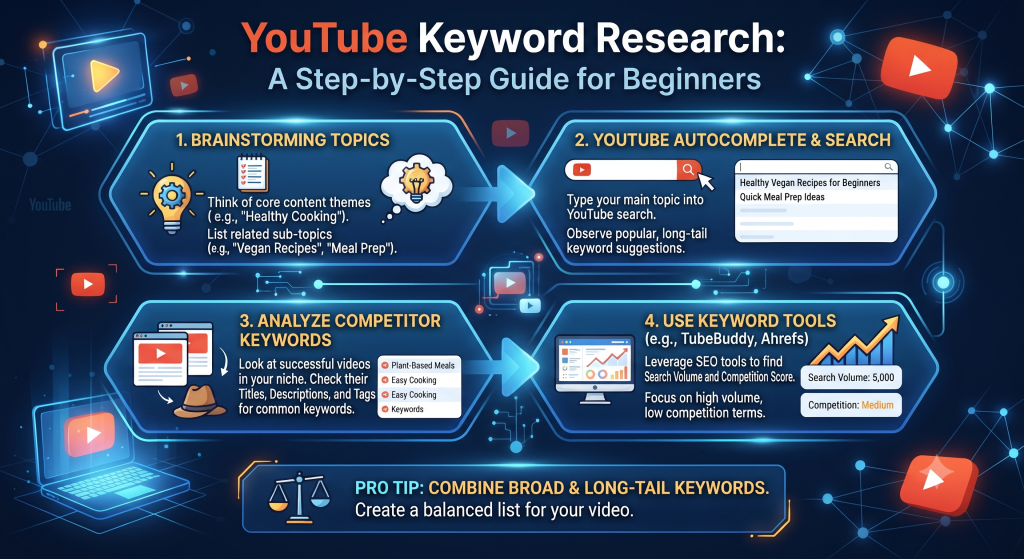
A lot of creators pick video topics based purely on what they feel like making that week. Sometimes that instinct pays off. Often, it means putting real effort into a video that only a handful of people were ever going to search for, while a slightly different angle on the same broad idea could have reached a genuinely larger, hungrier audience actively looking for exactly that content already.
Youtube keyword research closes that gap. It’s the process of figuring out what people are actually typing into YouTube’s search bar around your general topic, so you can build content around demand that already exists rather than guessing at what might resonate.
Why This Matters More Than Most Creators Realize
Here’s the uncomfortable truth: two videos can be equally well-made, equally well-edited, equally engaging — and still get wildly different view counts purely because one targeted a topic with real, consistent search demand and the other didn’t.
Keyword research doesn’t guarantee a video will succeed. Plenty of other factors still matter — thumbnail, title execution, actual retention. But it does something crucial: it makes sure that if your video does everything else right, there’s actually a meaningful audience out there searching for it in the first place. Without that foundation, even a perfectly executed video is working against a ceiling that no amount of editing skill can fix, since there’s simply no demand curve underneath it to lift the video higher no matter how well it’s made.
Step 1: Start With YouTube’s Own Autocomplete
This is the single easiest, most underused research tool available, and it’s built directly into YouTube’s search bar. Start typing a broad topic — say, “how to bake” — and pay attention to what autocompletes underneath.
These suggestions aren’t random. They reflect actual, common search queries real users have typed, which makes autocomplete a genuinely reliable window into real demand, not a guess. Try several variations of your core topic (“how to bake,” “best way to bake,” “baking tips for”) to surface a wider range of specific phrasings people are actually searching.
Step 2: Look at What’s Already Ranking
Once you have a handful of candidate keywords from autocomplete, search each one directly and look at what’s currently ranking on the first page of results. Pay attention to a few specific things:
How recent are the top-ranking videos? If the top results are all several years old, that can mean either the topic has evergreen staying power (good sign) or that newer creators simply haven’t found the opportunity yet (also potentially good, if you’re confident you can make something better).
How many views do the top videos have relative to their age? A five-year-old video with 50,000 views suggests a fairly low-demand, low-competition topic. A six-month-old video with 500,000 views suggests strong, current demand.
Are the top results from large established channels, or a mix including smaller ones? If small or newer channels are ranking well for a keyword, that’s a meaningful signal the topic isn’t purely dominated by channel size and authority — there’s a real opportunity for a well-made video regardless of your current subscriber count.
Step 3: Identify the Search Intent Behind the Keyword
Not all searches for a similar-sounding topic want the same thing. Someone searching “how to make sourdough bread” likely wants a full beginner tutorial. Someone searching “sourdough bread not rising” wants a specific troubleshooting fix. Someone searching “sourdough bread vs regular bread” wants a comparison, not a tutorial at all.
Matching your video’s actual content to the real intent behind a keyword matters enormously. A gorgeous, comprehensive baking tutorial will underperform for a searcher who just wanted a quick, specific troubleshooting answer, and vice versa — a quick troubleshooting video won’t satisfy someone who wanted the full comprehensive walkthrough. Getting this match right is often more important than the specific keyword phrasing itself.
Step 4: Check Search Volume vs Competition Realistically
There’s a natural tension in keyword research: high-volume keywords have more total potential viewers, but they’re usually also more competitive, dominated by established channels with years of authority behind them. Lower-volume, more specific long-tail keywords have a smaller ceiling but are often genuinely winnable for a newer or smaller channel.
A reasonable approach, especially for newer channels, is to build a mix: a few ambitious, higher-competition keyword targets mixed with several more specific, lower-competition long-tail ones you’re genuinely likely to actually rank for right now. Winning several smaller keywords consistently often builds more real channel momentum early on than repeatedly striking out on keywords dominated by channels ten times your size, and each small win also compounds into more overall search visibility for your channel as a whole.
Step 5: Validate With Related and “People Also Search For” Suggestions
Beyond the initial autocomplete suggestions, YouTube search results pages sometimes show related search suggestions or topic chips near the top of results. These provide additional validated keyword variations worth considering, straight from YouTube’s own understanding of related search behavior around your topic.
A Practical Walkthrough
Say your channel covers home fitness. You start with the broad idea “home workout.” Autocomplete surfaces variations like “home workout no equipment,” “home workout for beginners,” and “home workout routine for weight loss.”
Searching “home workout no equipment” shows a mix of large established channels and a few smaller ones with strong recent view counts — a promising, moderately competitive signal. Searching “home workout for beginners over 40” (a more specific long-tail variation you noticed in autocomplete) shows almost entirely older, lower-view-count videos from smaller channels — a much lower-competition opportunity with a smaller but real and clearly underserved audience.
Depending on your channel’s current size and goals, either could be the right call — the first for broader reach if you’re ready to compete, the second for a faster, more attainable win if you’re still building initial momentum and want a genuine shot at ranking well quickly. Neither choice is objectively wrong; it depends entirely on whether you’re optimizing for reach right now or building a track record of consistent wins first.
Common Keyword Research Mistakes
Relying purely on gut instinct without ever checking autocomplete or existing search results. This is the single most common gap, and it’s also the easiest one to fix, since autocomplete research takes only a few minutes.
Chasing only the highest-volume keyword regardless of realistic competition. Going straight for the biggest, most competitive keyword every single time often means competing against channels with years of accumulated authority, when a slightly narrower angle might realistically rank much faster.
Ignoring search intent mismatch. Making a video that doesn’t actually match what the searcher wanted, purely because it targets the right keyword phrase, tends to hurt retention and can actually work against your ranking over time rather than helping it.
Never revisiting old keyword research. Search behavior and trending phrasing shift over time. A keyword strategy that made sense a year or two ago may have newer, better variations worth incorporating into future content.
Using Competitor Videos as a Keyword Research Shortcut
Beyond autocomplete and manual search result analysis, one of the fastest ways to validate a keyword idea is to look directly at the actual metadata of videos already ranking well for it. Extracting the tags from 3-5 top-ranking videos around your target keyword (our Metadata Extractor does this from any public video URL) often reveals related keyword variations and phrasing you wouldn’t have thought to search for manually.
This works particularly well as a supplement to autocomplete rather than a replacement for it — autocomplete shows you what people are actively searching, while extracted tags show you what successful creators in that space have identified as related, valuable phrasing worth targeting alongside the main keyword. Cross-referencing both usually produces a stronger, more complete keyword list than either method alone, and it takes only a few extra minutes once you’ve already got a shortlist of candidate videos worth checking.
How Seasonal and Trending Factors Affect Keyword Research
Some keywords have relatively stable, consistent search volume year-round — “how to tie a tie” gets searched at a fairly steady rate regardless of season. Others spike dramatically at specific times — “gift ideas for” spikes hard in November and December, “tax filing tips” spikes in the weeks before a filing deadline, “New Year resolution ideas” spikes in late December and early January.
If your niche has any seasonal component, it’s worth timing keyword research and content planning around those cycles specifically, publishing evergreen-style content roughly 2-4 weeks ahead of when search interest typically peaks, giving YouTube’s systems time to start testing and ranking the video before the surge in actual searcher demand arrives.
Building a Simple Keyword Tracking System
As you research keywords over time, it’s worth keeping a simple running list — even a basic spreadsheet works fine — noting the keyword, your estimated read on competition level, whether you’ve already covered it, and any related long-tail variations you noticed along the way. This prevents the common problem of repeatedly re-researching the same core topics from scratch every time you sit down to plan new content, and it helps you spot genuine gaps in your existing catalog that a fresh video could fill, turning keyword research into a compounding asset rather than a task you redo from zero every single time.
Keyword Research Isn’t a One-Time Task Per Channel
A common mistake is treating keyword research as something you do once, early on, and then rely on that same list indefinitely. Search behavior shifts — new phrasing becomes common, older terms fall out of use, and entirely new sub-topics emerge as a niche evolves. Revisiting your core topic areas every few months with fresh autocomplete checks and a look at currently-ranking videos keeps your content aligned with how people are actually searching right now, not how they were searching when you first started the channel.
Frequently Asked Questions
Is there a dedicated YouTube keyword research tool, similar to Google keyword tools? YouTube doesn’t offer an official standalone keyword volume tool the way some search engines do, which is why autocomplete, direct search result analysis, and tools like our SEO Analyzer and Metadata Extractor (for checking what’s actually working on ranking videos) fill that gap in practice.
How many keyword variations should I research per video? There’s no fixed number, but checking 5-10 variations around your core topic idea typically surfaces enough real options to identify a genuinely strong, appropriately competitive target without spending excessive time on research alone.
Should keyword research come before or after deciding on a video topic? Ideally both work together — start with a general topic area you’re genuinely interested in and capable of covering well, then use keyword research to refine exactly which specific angle and phrasing within that topic has the best realistic combination of demand and winnable competition.
How do I know if a keyword is too competitive for my channel right now? If every result on the first page is from a channel dramatically larger than yours, with recent uploads still pulling strong view counts, that’s a sign to either look for a more specific long-tail variation of the same topic, or to treat that keyword as a longer-term goal once your channel has built more authority.
Put This Into Practice on Your Next Video
Before your next upload, spend ten minutes running through the steps above on your intended topic. Check autocomplete, glance at what’s currently ranking, and consider whether a more specific long-tail angle might actually be a faster, more realistic win than the broadest version of the idea. That small upfront investment often makes a bigger difference to a video’s eventual view count than any single editing or production choice that follows, simply because it ensures you’re aiming at demand that genuinely exists rather than hoping it does.
Unlock Your Channel’s Potential: Mastering AI for YouTube SEO