
Ask ten creators what goes in a YouTube description and most will say the same thing: a couple of sentences about the video, a link to their socials, maybe a “subscribe for more” line. Then they move on and forget about it entirely.
That’s a mistake, and it’s one of the more fixable ones on the platform. The description box is one of the few places on YouTube where you get essentially unlimited space to talk directly to both the algorithm and the viewer, and most creators use maybe 10% of what it’s actually capable of doing for them.
This isn’t about stuffing keywords into a wall of text nobody reads. It’s about understanding what the description is actually for, then writing one that does real work.
What the Description Is Actually For
The description serves three separate audiences at once, and good descriptions are written with all three in mind:
YouTube’s search and recommendation systems. YouTube reads your description as context about what the video contains. It’s not the single biggest ranking factor — watch time and click-through rate matter more — but it’s a real signal, especially for helping YouTube understand niche or ambiguous topics.
Viewers who are scanning before they click. On search results and some browse pages, the first couple of lines of your description show up as preview text underneath the title and thumbnail. That preview can be the deciding factor between a click and a scroll past.
Viewers who are already watching. People pause videos to check timestamps, look for a link you mentioned, or find a resource you referenced. A well-organized description makes the video more useful and keeps people from bouncing off in frustration when they can’t find something you mentioned out loud.
Most creators only think about the third group, if they think about the description at all. The real opportunity is in the first two.
The First Two Lines Matter More Than the Rest Combined
Here’s the part most people get wrong: YouTube typically only shows the first one to two lines (roughly 100-150 characters) of your description before a “Show more” button cuts it off, both in search results and on the video page itself.
That means if your description opens with “Hey guys welcome back to the channel, today we’re doing something a little different,” you’ve burned your most valuable, most visible text on filler that does nothing to earn a click or tell YouTube what the video is about.
Instead, that opening line should function almost like a meta description — specific, keyword-relevant, and written to make someone want to see more. Something like: “Learn exactly how to fix camera shake in Premiere Pro using the built-in warp stabilizer — no plugins needed” tells a scanning viewer immediately whether this video solves their problem, and it gives YouTube a clear, specific topic signal in the process.
What a Genuinely Well-Structured Description Includes
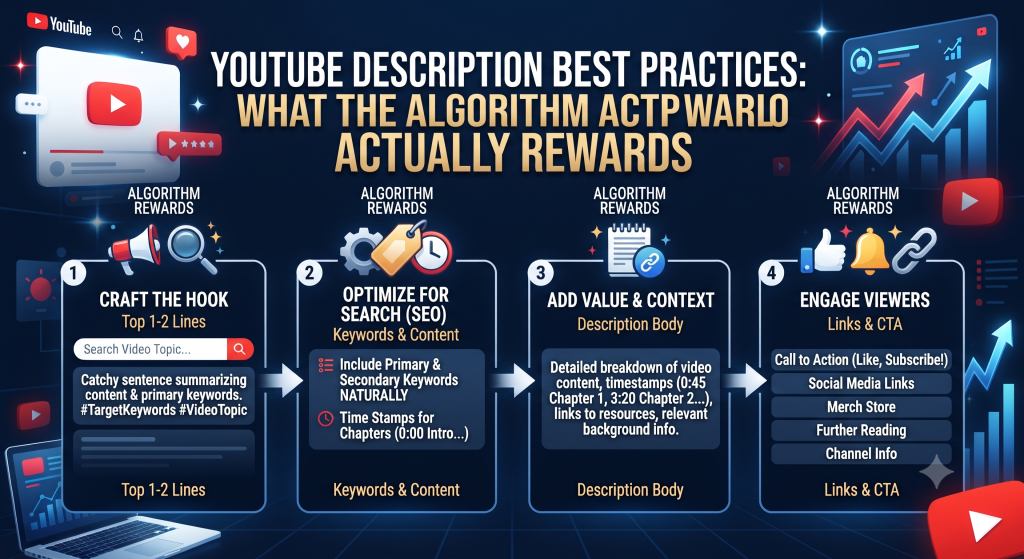
A description that’s actually doing its job usually has these pieces, roughly in this order:
A strong opening line or two. Specific, keyword-relevant, written for a human scanning quickly — not a generic greeting.
A short expanded summary. Two or three sentences giving more context about what’s covered, written naturally rather than as a keyword list.
Timestamps, if the video has distinct sections. This is genuinely useful to viewers and also gives YouTube additional structured context about your content. Videos with timestamps often see better retention because viewers can jump to the part they actually want.
Relevant links. Tools mentioned in the video, related videos on your channel, your socials — but placed after the important content, not crammed at the very top where they push your actual description text below the fold.
A closing section with consistent boilerplate. Your channel tagline, social links, contact info — the stuff that’s the same across every video. This is fine to include, it’s just not what should occupy your precious first two lines.
A Realistic Before-and-After
Before: “Hey everyone, welcome back! Today’s video is all about editing tips. Hope you enjoy, don’t forget to like and subscribe! Follow me on Instagram @creator123”
After: “Fix the 3 most common editing mistakes that quietly kill retention — pacing, jump cuts, and audio levels — explained with real before/after clips from my own videos.
00:00 Intro 00:45 Mistake #1: Pacing that drags 3:20 Mistake #2: Jarring jump cuts 6:10 Mistake #3: Inconsistent audio levels 9:00 Quick fixes you can apply today
Tools mentioned in this video: [link] More editing breakdowns: [link to playlist]
Follow along on Instagram: @creator123″
Same video, dramatically more useful description — to YouTube, to a scanning viewer, and to someone already watching who wants to jump to a specific section.
How Length Actually Factors In
There’s a persistent myth that longer descriptions automatically rank better. That’s not really true. What actually helps is a description with enough real, relevant context — not padding to hit some word count.
A tightly written 150-word description that’s specific and well-organized will typically outperform a rambling 500-word one stuffed with repeated keyword variations. YouTube’s systems are good enough now to recognize keyword stuffing for what it is, and it can work against you rather than for you.
The right length is: long enough to genuinely describe the video and its value, organized enough to be scannable, and no longer than that.
Common Description Mistakes Worth Fixing
Leading with a greeting instead of substance. As covered above, your first line is prime real estate — don’t waste it on “hey guys.”
Repeating the exact same boilerplate word-for-word across every single video with zero variation. Some consistency is good and expected. Zero variation at all, especially in that critical first line, means every video looks identical to both viewers and YouTube’s systems.
Cramming links at the very top. If the first thing in your description is three links before any actual text about the video, you’ve pushed your real content below the visible preview area.
No timestamps on videos with clear distinct sections. This is a genuinely easy win that a lot of creators skip simply because it takes a few extra minutes to add manually.
Keyword-stuffing that reads unnaturally. A description that repeats your main keyword five times in slightly different phrasing reads badly to humans and doesn’t provide the algorithmic benefit people assume it does.
How Our Description Generator Speeds This Up
Writing a genuinely good, structured description for every single upload — with a strong opening line, a natural summary, and proper organization — takes real time when you’re doing it manually for every video, especially if you’re publishing frequently.
Our free Title & Description Generator handles the heavy lifting of that first draft. Give it your topic and a rough outline of what the video covers, and it generates a structured description with a strong opening line, a natural expanded summary, and space for you to drop in your own timestamps and links. You’re not stuck staring at a blank text box for ten minutes trying to figure out how to open the description — you get a solid starting point you can adjust or expand in under a minute.
Hashtags in Descriptions: Do They Actually Help?
You’ve probably noticed hashtags showing up at the bottom of descriptions, sometimes also appearing above the video title itself. YouTube allows up to 15 hashtags in a description, though only the first three are pulled up to display above the title.
The honest answer on whether they help: modestly, and only when used correctly. Hashtags work best when they’re genuinely relevant category or topic tags — think “#sourdough” or “#videediting” — rather than generic, overused ones like “#viral” or “#fyp” that carry no real topical signal and are used on millions of unrelated videos.
Using more than 15 hashtags actually causes YouTube to ignore all of them, so restraint here isn’t just good practice, it’s a hard technical limit. Three to five well-chosen, specific hashtags tend to outperform a wall of generic ones every time.
Descriptions for Shorts vs Long-Form Videos
Shorts descriptions work a little differently in practice, even though the underlying field is the same. Because Shorts are consumed quickly and the description isn’t nearly as visible during viewing, the priority shifts almost entirely toward that first line doing double duty as both a search signal and a quick context clue for anyone who does tap to expand it.
Timestamps make far less sense on a 60-second Short, obviously, but a strong specific opening line matters just as much, if not more, since Shorts often surface to entirely new audiences who have zero context on your channel beyond what’s in front of them right that second.
For long-form video, you have more room to build out the fuller structure covered above — timestamps, an expanded summary, organized links — because viewers are settling in for a longer watch and are more likely to actually reference the description mid-video.
Localization and Multiple Languages
If a meaningful portion of your audience watches in a different primary language than the one you create in, there’s an underused feature worth knowing about: YouTube allows you to add translated titles and descriptions for specific languages through YouTube Studio’s translation settings.
This isn’t the same as just writing your original description in two languages back to back, which reads awkwardly and dilutes your primary keyword signal. Proper localized descriptions show the translated version to viewers whose account language matches, while everyone else still sees your original — giving you the best of both without cluttering either version.
This is a bigger lift than most creators want to take on for every single video, but for content with strong performance in a specific non-native-language region, it’s worth the extra effort on your best-performing uploads specifically.
Descriptions and Chapters: A Small But Meaningful Distinction
Timestamps typed manually into a description (like “2:15 The main mistake”) are useful, but YouTube also supports a related, slightly more powerful feature: chapters, which show up as a visual scrubber bar with named segments directly under the video player.
Chapters are created automatically when your description contains at least three timestamps formatted correctly, starting at 0:00. The practical difference is that chapters are more visually discoverable — viewers see the segment breakdown immediately in the player itself, not just by scrolling down to read the description.
If you’re already adding timestamps for viewer convenience, formatting them correctly to trigger the chapters feature is essentially a free upgrade that costs nothing extra to implement.
Frequently Asked Questions
Does the description actually affect ranking, or is it just for viewers? Both. YouTube uses your description as contextual signal for what your video is about, particularly useful for disambiguating topics or ranking for related searches. It’s not as heavily weighted as watch time or click-through rate, but it’s a real, usable signal — not just cosmetic text for viewers.
How long should a YouTube description actually be? There’s no fixed ideal length. What matters is that the first 1-2 lines are strong and specific, and the rest is organized and genuinely useful — timestamps, links, a clear summary. A focused 150-200 words often outperforms a padded 500-word wall of text.
Should I put my main keyword in the description multiple times? Once naturally in the opening line and once more naturally within the body is generally enough. Repeating it forcefully multiple times reads as spam to viewers and doesn’t provide meaningful additional algorithmic benefit.
Try It on Your Next Upload
Before your next video goes live, take thirty seconds to rewrite just the first line of the description with this in mind — specific, keyword-relevant, written for a scanning viewer. That single change alone is often the highest-leverage fix available, and it takes almost no time to apply.