
There’s a surprisingly common moment creators and marketers run into: you need a specific YouTube thumbnail — maybe your own from an old video, maybe a competitor’s for a mood board, maybe one you want to reference for a design brief — and there’s no obvious “download” button anywhere on YouTube itself.
Right-clicking the small thumbnail preview usually gets you a tiny, low-resolution image that looks blurry the moment you try to use it for anything beyond a quick reference. That’s because the visible thumbnail on the page is often a compressed, small version — not the full-size image YouTube actually stores.
This is exactly the gap a proper youtube thumbnail downloader closes.
Why the “Right-Click Save” Method Falls Short
When you right-click a thumbnail on a YouTube search results page or in the sidebar, your browser saves whatever image file is actually loaded at that moment — which is almost always a small, compressed version sized for that specific part of the page. It’s meant to load fast, not to look good blown up.
The actual thumbnail YouTube stores is typically much larger — commonly 1280×720 pixels, sometimes with an even higher-resolution version available depending on how it was uploaded. That’s the version you want if you’re doing anything beyond a passing glance: printing it, using it in a presentation, studying its design choices up close, or referencing it while building your own.
Common Reasons People Need a Full-Size Thumbnail
Competitive research. If you’re studying what’s working in your niche, a small blurry thumbnail doesn’t show you the actual design decisions — font choice, color contrast, facial expression, text placement. You need the full-resolution version to actually study it properly.
Recovering your own old thumbnail. It happens more often than people expect — a creator loses the original design file for an old thumbnail (maybe it was on an old laptop, maybe the design software file got deleted) but the video itself is still up. Pulling the full-size thumbnail off YouTube directly is often the fastest way to get a usable copy back.
Building a swipe file or mood board. Designers and marketers commonly collect strong-performing thumbnails as inspiration for color palettes, layouts, and composition. That only works if the images are high enough quality to actually study.
Presentations and reports. If you’re putting together a deck showing top-performing content in a niche, a crisp, full-size thumbnail looks far more professional than a pixelated screenshot.
How to Download a Thumbnail Properly
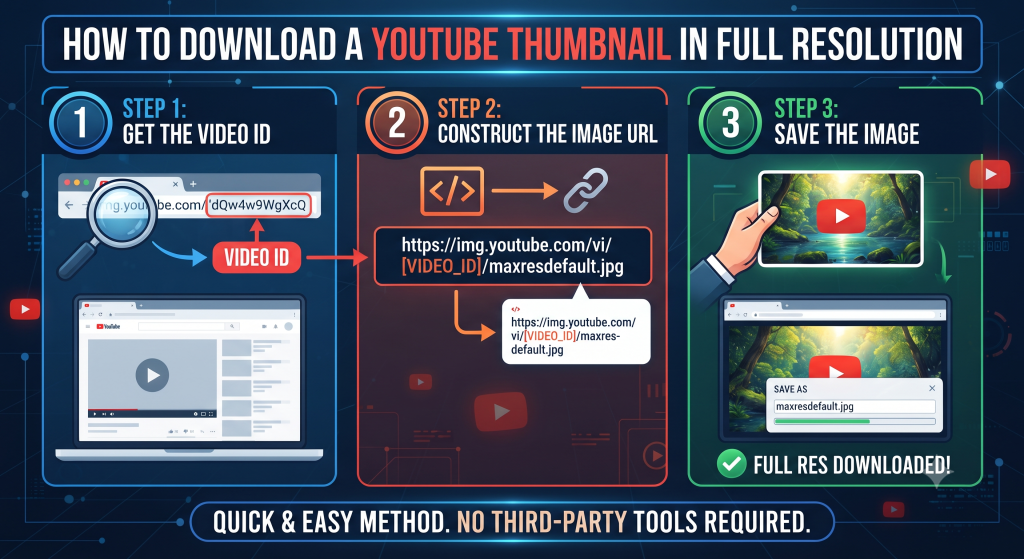
Our Thumbnail Downloader makes this a two-step process: paste the video URL, get every available resolution of that thumbnail laid out for you to choose from and download directly.
Here’s what typically happens behind the scenes when you do this manually versus using the tool:
The manual way: You’d need to know YouTube’s specific thumbnail URL structure (which involves the video ID and a specific filename pattern), type it into your browser correctly, and hope the highest-resolution version actually exists for that particular video — not all videos have every resolution tier available. Get any part of that URL wrong and you’ll get a broken image or the wrong size.
The tool way: Paste the video link, and the resolutions that actually exist for that video are pulled and displayed automatically — no guessing, no manually constructing URLs, no risk of grabbing a broken link.
A Quick Note on Using Other Creators’ Thumbnails
It’s worth being upfront about something here: being able to download a thumbnail doesn’t automatically mean you have unrestricted rights to reuse it however you want. Thumbnails, like any other image, are typically the intellectual property of whoever created them.
Downloading a competitor’s thumbnail to study its design, discuss it in an article like this one, or reference it privately for inspiration is generally considered fair use in most contexts. Directly reposting someone else’s thumbnail as your own, or using it in a way that could be mistaken for their content, is a different situation entirely and something to actively avoid.
If you’re downloading your own old thumbnails, none of this applies — that’s simply retrieving your own work.
What Resolution Should You Actually Use?
For most practical purposes:
1280×720 is the standard high-quality thumbnail resolution and works well for nearly everything — studying design, using in a presentation, general reference.
Smaller preview sizes are fine if you just need a quick visual reference and file size matters more than crispness, like embedding a small preview image in a spreadsheet or internal doc.
If you’re not sure which to grab, the largest available option is almost always the safer choice — you can always resize down later, but you can’t add resolution to an image that wasn’t captured at a higher quality to begin with.
Try It Now
If there’s a thumbnail you’ve been meaning to grab — your own, a competitor’s for research, or one you spotted and wanted to study more closely — head to the Thumbnail Downloader, paste the video URL, and pick the resolution you need. It takes a few seconds and skips all the manual guesswork entirely.