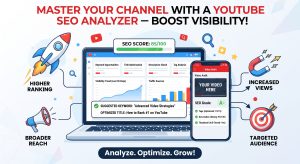

Want to know why some YouTube videos rank at the top while others get buried? It usually comes down to SEO — and our free YouTube SEO checker and analyzer gives you a clear, instant picture of exactly how well any video is optimized.

Paste a video URL into the tool above and you’ll get a full SEO score along with a breakdown of the tags, title length, and description quality behind it. It works on any public video, including your own.

What Is YouTube SEO, and Why Should You Care?

YouTube SEO is the process of optimizing a video so it ranks higher in search and gets recommended to more viewers. The same way Google reads signals to rank websites, YouTube reads its own set of signals to decide which videos surface at the top of search results.

The main factors it looks at are your title, description, tags, hashtags, and engagement metrics like watch time and click-through rate. Get these right, and a video has a real shot at organic discovery — without spending a cent on ads. For creators trying to grow a channel, this is one of the highest-leverage things you can control.

What Our YouTube SEO Analyzer Actually Checks

The tool runs through several key SEO elements and scores each one:

Title length. YouTube recommends keeping titles between 40 and 70 characters. Too short, and you’re leaving keyword opportunities on the table. Too long, and it gets cut off in search results.

Numbers in the title. Titles with numbers — “7 Ways to…”, “Top 10…” — tend to pull more clicks because they set a clear expectation upfront. The analyzer checks whether yours uses this.

Description length. A well-written description helps YouTube understand what your video is actually about. We’re looking for at least 200 characters of real context, not a placeholder line.

Tags. Tags carry less ranking weight than they used to, but having 8 or more relevant ones still helps YouTube categorize your video correctly. The tool counts and displays them all, so you can study exactly what a video is targeting.

Links in the description. A description with external or internal links signals an engaged creator directing viewers to more resources — a small but real SEO signal.

Hashtags. Using at least two relevant hashtags makes your video discoverable through hashtag search, and the analyzer flags whether that box is checked.

How to Use It

Getting your analysis takes seconds:

  1. Find the video URL. Open the video you want to check and copy the link from your browser (or tap Share → Copy Link on mobile).
  2. Paste and analyze. Drop the URL into the box at the top and click Analyze.
  3. Review your results. You’ll see your overall score out of 100, the full tag list, and individual pass/fail checks across every factor above.

How to Read Your Score

  • 70–100 — Well Optimized. Strong signals across title, description, and tags. You’re well positioned to rank.
  • 40–69 — Needs Improvement. Some elements are missing or underused. A few targeted changes could meaningfully boost visibility.
  • 0–39 — Poorly Optimized. Key signals are missing, and the video may struggle to reach new viewers through search without changes.

Using This Tool to Improve Your Own Videos

The most effective way to use the analyzer isn’t just checking your own uploads — it’s studying what’s already working. Search your target keyword on YouTube, pick the top three or four results, and run each one through the tool. Pay attention to the tags they’re using, how their titles are structured, and how long their descriptions run.

Patterns emerge quickly: recurring tags, title formats that keep showing up, description styles that consistently rank. Some SEO professionals call this competitor tag research, and it’s one of the most practical techniques available to creators at any level — you’re not guessing, you’re reverse-engineering what’s already proven to work.

Frequently Asked Questions

Can I analyze my own videos? Yes — paste any public video URL from your own channel and you’ll get the same full breakdown. It’s a solid way to audit existing content and spot what needs work.

Why does the tool show no tags for some videos? Some creators deliberately hide their tags to keep their keyword strategy private. When that happens, the tool will let you know rather than leave you guessing.

Is this free? Completely — no account, no limits, no paywall.

Does it work for YouTube Shorts? Yes, Shorts links run through the same full analysis as standard videos.

Can I copy tags from another video? Yes. Tags appear as clickable pills with a Copy All button, so you can grab the full list for reference.

How accurate is the score? It’s based on metadata signals that creators and SEO professionals treat as best-practice benchmarks. It’s a reliable guide for spotting gaps — though the actual ranking factor is always YouTube’s own algorithm, which weighs plenty of signals we can’t see (like watch time and audience retention).

Why Creators Trust This Tool

We built this to give you real, actionable information — not a generic keyword checker with no context for YouTube specifically. Everything runs in your browser with nothing stored on our servers, so you can analyze as many videos as you want without limits or privacy concerns.

For more on how tags and metadata affect discoverability, the YouTube Help Centre guide on video tags and metadata is a good official reference.

Explore more free tools: YouTube Thumbnail Downloader for grabbing thumbnails in full resolution, or the YouTube Metadata Extractor for pulling hidden tags and full descriptions from any video.

Related Articles

Unlock Your Potential with the Best Free YouTube Tools for Creators

The Power of Free YouTube Tools for Creators Embarking on a journey as a YouTube creator can be incredibly rewarding, but it also comes with its fair share of challenges. Standing out in a sea of content requires more than just great video ideas; it demands strategic planning and the right resources. Fortunately, a wealth

Read More »

Elevate Your Channel: Discover Top Free YouTube Tools for Creators

Empowering Your Channel: The Best Free YouTube Tools for Creators In the vast and ever-growing landscape of YouTube, standing out and building a thriving channel can seem like a monumental task. Creators often grapple with content ideas, editing, promotion, and understanding their audience. Thankfully, a wealth of incredible free youtube tools for creators exists, designed

Read More »
Your Guide to YouTube Shorts Viral Strategies

Unlock Viral Growth: Your Guide to YouTube Shorts Viral Strategies

YouTube has become an indispensable platform for creators looking to share their passions and build a community. In this ever-evolving digital landscape, a new opportunity has emerged that promises rapid growth and widespread discoverability: YouTube Shorts. These bite-sized videos, echoing the success of platforms like TikTok, offer a unique pathway to capture attention and broaden
Read More »

Mastering Your YouTube Shorts Viral Strategy: Lessons from TikTok for Creators

The digital landscape for creators is constantly evolving, with short-form video emerging as a powerful avenue for reaching new audiences. For YouTube creators, understanding how to craft a winning YouTube Shorts viral strategy isn’t just an option; it’s a necessity for growth. While TikTok often gets credit for pioneering the short-form video craze, YouTube Shorts
Read More »

How to Get Your First 1,000 Subscribers on YouTube

The first 1,000 subscribers are, by a wide margin, the hardest ones you’ll ever earn. Not because the content needs to be worse or better than what comes later — but because you’re starting with zero algorithmic trust, zero existing audience momentum, and zero of the compounding advantages that make growth easier once a channel
Read More »

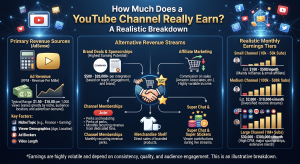
How Much Does a YouTube Channel Really Earn? A Realistic Breakdown

Everyone’s curious about this at some point — you watch a creator with a modest-looking subscriber count who clearly isn’t struggling financially, or you see a massive channel and assume they must be making a fortune, and you wonder whether that assumption is even close to accurate. The honest answer is that YouTube earnings are
Read More »
Infographic chart explaining the difference between video resolution canvas size and data bitrate flow.

The Modern Creator’s Guide to Video Resolutions and Bitrates

The Modern Creator’s Guide to Video Resolutions and Bitrates When you watch a video online, it is easy to assume that higher numbers always equal a better picture. We see tags like 1080p, 4K, or 60FPS plastered across streaming platforms, and our instinct is to click the highest option available. However, for digital content creators,

Read More »
Scroll to Top